# HTTP POST API
> Call the DolphinSOE pronunciation assessment API over HTTP POST: create a token, then submit audio and question type parameters as JSON or form data.
Source: https://soe.dolphinvoice.ai/en/docs/sdk/http2
## Interaction Flow

POST requests support **JSON format** and **Form-Data format**. Please choose one according to your needs.
## 1. Create Token
#### Request URL
```http
POST https://api.soe.dolphin-ai.jp/auth/v2/createToken/{appId}
```
`{appId}` is the appId assigned to your company by business, passed as a URL parameter.
#### Header
| **Parameter Name** | **Type** | **Description** | **Default Value** |
| - | - | - | - |
| Content-Type | String | Request type | application/json |
#### Body (JSON)
| **Parameter Name** | **Type** | **Description** | **Default Value** |
| - | - | - | - |
| timestamp | Int | Unix timestamp (10 digits) | Required |
| signature | String | Digital signature | Required |
| sdk | String | Fixed value: `http` | Required |
`signature` is constructed as follows:
1. Use `appId` and `timestamp` request parameters to construct the canonical request string `stringToSign` (note the order of parameters), like:
```
appId=XXXX-XXXX-XXXX×tamp=1234567890
```
2. Use the `HMAC-SHA1` signing algorithm to calculate the digital signature of the request string constructed in the previous step (Base64 encoded). Use the appSecret provided to your company as the key for the signing algorithm.
```
signature = Base64(HMAC-SHA1(stringToSign, appSecret))
```
- [HMAC-SHA1 Online Calculation Tool](https://1024tools.com/hmac) can be used to verify if the generated digital signature is correct:
- Message: Fill in the `stringToSign` (request string) constructed in step 1
- Algorithm: Choose `SHA1`
- Key: Fill in your appSecret
- Do not check the box below
- Click the calculate button, “Result B” is the correct digital signature. If your generated signature matches this result, your signature is correct.
##### Digital Signature Example Code
| 
[Python](https://soe.dolphinvoice.ai/en/docs/sdk/signature_python) | 
[Java](https://soe.dolphinvoice.ai/en/docs/sdk/signature_java) | 
[Golang](https://soe.dolphinvoice.ai/en/docs/sdk/signature_golang) | 
[C Language](https://soe.dolphinvoice.ai/en/docs/sdk/signature_c) | 
[C#](https://soe.dolphinvoice.ai/en/docs/sdk/signature_cs) |
| :-: | :-: | :-: | :-: | :-: |
#### Response
```json
{
"status": "00000",
"message": "success",
"data": {
"appId": "my-app-id-xxxxx", // AppId used to create the token
"token": "xxxxxxxxxxxxxxxxxx", // Generated token, valid for 168 hours
"currentTime": 1660523938, // Current server time
"expireTime": 1660527538 // Token expiration timestamp (server time)
}
}
```
## 2. Initiate HTTP POST Request
### Connection Address
The format is:
```
https://api.soe.dolphin-ai.jp/soe/en-US/{question type code}/v2/api
```
Please refer to the [Question Type Documentation](https://soe.dolphinvoice.ai/en/docs/mode/intro) to get the corresponding question type code.
For example, the connection address for the word question type (question type code: word) is:
```http
https://api.soe.dolphin-ai.jp/soe/en-US/word/v2/api
```
### Initiate Request
> **Note:**
>
> The evaluation time is closely related to the length of the audio and text. For chapter, topic, retell question types, the evaluation time may be longer, so please pay attention to the setting of the responseTimeout parameter to prevent timeout of the return results.
#### Header
| **Parameter Name** | **Type** | **Description** | **Default Value** |
| - | - | - | - |
| Authorization | String | Standard HTTP header, set the authentication information. The format must be `Bearer ` (note the space after `Bearer`). | Required |
| sdk | String | Fixed value: `http` | Required |
| version | String | Fixed value: `1.0.0.0` | Required |
| os | String | Operating system and version, e.g., `Ubuntu 18.04` | Required |
| deviceId | String | Unique device identifier, e.g., `0A15C7578CA2` | Required |
#### ① Body (JSON Format)
| **Parameter Name** | **Type** | **Description** | **Default Value** |
| - | - | - | - |
| langType | string | Language option, English: `en-US` | Required |
| format | string | Audio format, supports `opus_raw`, `pcm`, `wav`, `mp3`, `amr`, `ogg`, `m4a`, and `speex_wechat`; see [Supported Audio Formats](https://soe.dolphinvoice.ai/en/docs/public/datadict/format) | Required |
| sampleRate | int | Audio sampling rate (Hz), currently only `16000` is supported | Required |
| audioBase64 | string | Base64-encoded audio file | Provide exactly one of `audioBase64` and `audioLink` |
| audioLink | string | Public download URL of the input audio file | Provide exactly one of `audioBase64` and `audioLink` |
| audioUrl | boolean | Set to `true` to include the audio download URL in the evaluation result | `false` |
| looseness | int | Scoring leniency, range: 0-9, the larger the value, the more lenient | 4 |
| connectTimeout | int | Connection timeout (seconds), range: 5-60 | 15 |
| responseTimeout | int | Response timeout (seconds), range: 5-60 | For chapter, topic, retell types: 45
For other types: 15 |
| scale | int | Scoring scale, range: 1-100 | 100 |
| scaleF | float | Floating-point scoring scale, valid range: (0, 100], with **at most one decimal place** (for example, 0.5, 1.0, or 99.9).
**Takes precedence over scale:** when `scaleF > 0`, use `scaleF` and ignore `scale`; when `scaleF = 0` (default) or is omitted, use `scale`.
**0 is reserved** and is not an actual scoring scale.
**Precision and validation:** values with more than one decimal place are rounded to one decimal place before validation (for example, 0.55 becomes 0.6). If the rounded value is outside (0, 100] (for example, 0.04 becomes 0.0, or 100.05 becomes 100.1), or the input is otherwise invalid (such as a negative number), it is treated as 0: ignore `scaleF` and fall back to `scale`. | 0 |
| ratio | float | Scoring adjustment coefficient, range: 0.8-1.5 (up to 3 decimal places)
The coefficient adjusts scores between 30\~90 (percentage scale), scores outside this range remain unchanged
`ratio` >1.0, score is adjusted up, closer to 75, higher the adjustment
`ratio` \<1.0, score is adjusted down, closer to 75, higher the adjustment
`ratio` =1.0, no score adjustment | 1.0 |
| userId | string | The userId entered will be returned in the evaluation result | Empty |
| **params** | **dict** | Question type parameters, please refer to [Question Type Documentation](https://soe.dolphinvoice.ai/en/docs/mode/intro_http) for the corresponding question type parameter format. | Required |
**Body (JSON Format) Example**
```json
{
"params": {
"mode": "word",
"refText": "hello"
},
"audioBase64": "xxxxxxxxxxxxxxxxxxxxx",
"audioUrl": true,
"sampleRate": 16000,
"format": "mp3",
"langType": "en-US",
"looseness": 4,
"userId": "uid115862530"
}
```
#### ② Body (form-data Format)
| **Parameter Name** | **Type** | **Description** | **Default Value** |
| - | - | - | - |
| langType | text | Language option, English: `en-US` | Required |
| format | text | Audio format, supports `opus_raw`, `pcm`, `wav`, `mp3`, `amr`, `ogg`, `m4a`, and `speex_wechat`; see [Supported Audio Formats](https://soe.dolphinvoice.ai/en/docs/public/datadict/format) | Required |
| sampleRate | text | Audio sampling rate (Hz), currently only `16000` is supported | Required |
| audioFile | file | Audio file | Required |
| looseness | text | Scoring leniency, range: 0-9, the larger the value, the more lenient | 4 |
| connectTimeout | text | Connection timeout (seconds), range: 5-60 | 15 |
| responseTimeout | text | Response timeout (seconds), range:5-60 | For chapter, topic, retell types: 45
For other types: 15 |
| scale | text | Scoring scale, range: 1-100 | 100 |
| scaleF | text | Floating-point scoring scale, valid range: (0, 100], with **at most one decimal place** (for example, 0.5, 1.0, or 99.9).
**Takes precedence over scale:** when `scaleF > 0`, use `scaleF` and ignore `scale`; when `scaleF = 0` (default) or is omitted, use `scale`.
**0 is reserved** and is not an actual scoring scale.
**Precision and validation:** values with more than one decimal place are rounded to one decimal place before validation (for example, 0.55 becomes 0.6). If the rounded value is outside (0, 100] (for example, 0.04 becomes 0.0, or 100.05 becomes 100.1), or the input is otherwise invalid (such as a negative number), it is treated as 0: ignore `scaleF` and fall back to `scale`. | 0 |
| ratio | float | Scoring adjustment coefficient, range: 0.8-1.5 (up to 3 decimal places)
The coefficient adjusts scores between 30\~90 (percentage scale), scores outside this range remain unchanged
`ratio` >1.0, score is adjusted up, closer to 75, higher the adjustment
`ratio` \<1.0, score is adjusted down, closer to 75, higher the adjustment
`ratio` =1.0, no score adjustment | 1.0 |
| userId | text | The userId entered will be returned in the evaluation result | Empty |
| maxPrefixSilenceMs | int | Threshold for detecting initial silence in voice input (milliseconds), range \[0-30000]. A Warning event is returned if the duration of silence exceeds this threshold after recording starts.
If the parameter value is set to 0 or the parameter is not provided, the initial silence detection feature is not enabled. | 0 |
| maxSuffixSilenceMs | int | Threshold for detecting trailing silence in voice input (milliseconds), range \[0-30000]. The evaluation automatically ends if the duration of silence at the end of the sentence exceeds this threshold.
If the parameter value is set to 0 or the parameter is not provided, the trailing silence detection feature is not enabled. | 0 |
| connti | int | Whether to enable detection of connected speech and missing bursts, default is 0, only for English
When connti is 0, it is not enabled
When connti is 1, it is enabled | 0 |
| mini | int | Default is 0, returns full data, when set to 1, only returns simplified data (total score, fluency, accuracy, completeness, etc.) | 0 |
| precision | string | Set scoring precision, default is 0, supports only 0, 0.1, 0.25, 0.5, 1. If the set value is not one of these, it is treated as 0 | 0 |
| **params** | text | Question type parameters, please refer to [Question Type Documentation](https://soe.dolphinvoice.ai/en/docs/mode/intro_http) for the corresponding question type parameter format. | Required |
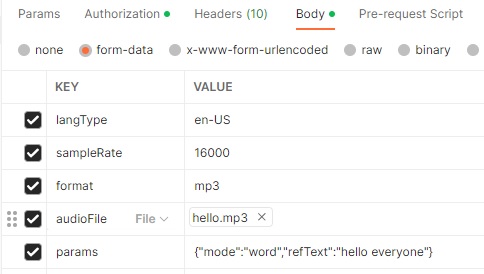
**Body (form-data Format) Example**
For testing with Postman as an example:
#### Return Result
Please refer to the corresponding [Question Type Documentation](https://soe.dolphinvoice.ai/en/docs/mode/intro_http).
## 4. Status Code Table
Please refer to the [Status Codes](https://soe.dolphinvoice.ai/en/docs/sdk/status) document.